Solved Microsoft Power Automate cloud flow issue on refresh token has expired due to inactivity (Error Code 700082)


When a user fills up an online Microsoft Form and submit, it will automatically trigger a Microsoft Power Automate cloud flow that will capture the user input data from the online Microsoft Form and send for approval via email.

This has been working fine until from August 2024, the trigger connection has failed due to the expiration or invalidity of the refresh token stored in the connection:

Power Automate Flow issue on refresh token has expired (Error Code 700082)
Error Code: 700082

Message:
The refresh token has expired due to inactivity. The token was issued on {issueDate} and was inactive for {time}.

Remediation:
Expected part of the token lifecycle - the user went an extended period of time without using the application, so the token was expired when the app attempted to refresh it.


Microsoft is working on a fix: Known issue 4455860 - Power Automate run via Power Apps fails with "Error from token exchange".


Solution

You should be able to fix the "Token Exchange failures" by verifying your account with. You may need to re-enter your password.
  1. Login to the Power Automate website > My flows.

  2. Under the Cloud flows > Click on your xxx flow name (example shown here is "Access xxx Application Form") > Edit.


  3. As the Microsoft Power Automate cloud flow is trigger upon the user submiting the online Microsoft Form "Access xxx Application Form", I click on the top first Microsoft Form (When the Access xxx Application Form is submitted) "..." to see the pop-up menu > "Add new connection":


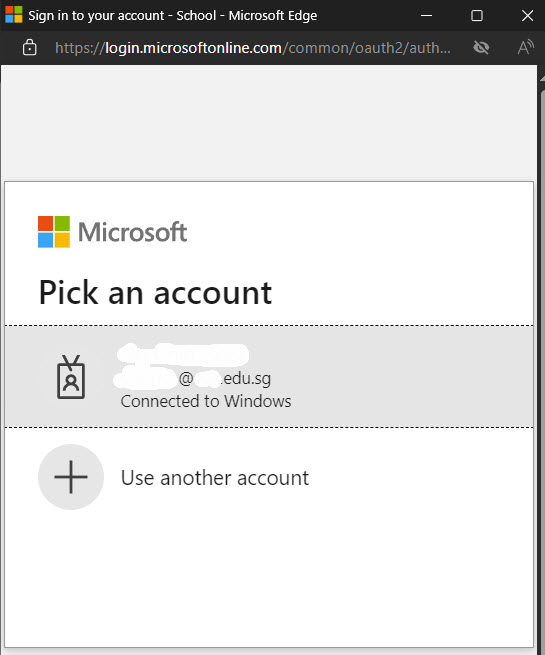
  4.  At the pop-up login window, pick your Microsoft account to sign in to create a connection to the Microsoft Form:


  5. Then, I click on the top second Microsoft Form (Get Access xxx Application Form response details) "..." to see the pop-up menu and select that newly created xxx@yyy.edu.sg connection.


After re-verified my account to create a new connection to the online Microsoft Form, the "Token Exchange failures" is solved.

Bought a super single mattress with bedframe experience from Casa Living Pte. Ltd. (or Casa Italy) (2024-10-29)


On 29/9/2024 at the Singapore EXPO Home & Furnishing event, I bought a Firm Rest Super Single Mattress with Super Single Bedframe at S$1050.00 after bargain (initially was S$1999.00) from Casa Living Pte. Ltd. (or Casa Italy). I had to pay a 70% advance payment of S$750.00 due to their Term And Conditions:

Casa Living Pte. Ltd. (or Casa Italy) TERM AND CONDITIONS:

1) All order shall be liable for 70% deposit of the total amount. Fully Payment before delivery all goods.

2) Deposit will be forfeited upon cancellation of the SALES ORDER or even part thereof. No cancellation, no refundable upon signing of this sales order.

...

5) Default, delay or defect in any one or more of the delivery (iss) or items) shall be considered as agregrated default without giving the buyers right to cancel the whole orders.

...

7) CASA LIVING reserves the right to schedule delivery date and delivery time.
[JackNg: Please note that the goods are deliver from Casa Living Pte. Ltd. Malaysia Headquater (HQ), and the delivery schedule is only on every Monday, Wednesday or Friday]

...

By the authorized signature endorsed on this document, the buyer acknowledges the receipt of the goods mentioned here in and the agreed term and condition that the title to the goods does not pass to the buyer until the purchase price is paid in full and that the goods could be taken back if this is not done.

Casa Living Pte Ltd (or Casa Italy) receipt


The delivery date is after 3 weeks later, on 18/10/2024 (Friday).


On 16/10/2024 (Wednesday), I was informed by Catherine from Casa Italy to make the balance payment of S$300 via PayNow. Before payment, I double-confirmed the delivery on 18/10/2024 (Friday) after 18:30 pm onward (Timing changed from 15:00 pm to 18:30 pm because of a last minute afternoon meeting at work on 18/10/2024).

As Catherine had confirmed that their transporter was able to deliver the goods on 18/10/2024 (Friday) after 18:30 pm onward, I paid S$1 first via PayNow, confirmed that the company had received the S$1 via WhatsApp before paying the balance of S$299.


On 17/10/2024 (Thursday) at 17:10 pm, I was informed by Casa Living, Amy that their Malaysia HQ company had made a mistake on my order to deliver single mattress, instead of the super single mattress that I had ordered. Casa Living Malaysia HQ company does not had stock on super single mattress, and the stock might arrive on 19/10/2024 (Satursday). In the end, the super single mattress stock did not arrive on 19/10/2024 (Satursday). As Casa Living 21/10/2024 (Monday) schedule was already full, the next available delivery will be 23/10/2024 (Wednesday).

On 18/10/2024 (Friday) at 17:56 pm, Amy informed that one of their customer had postponed the 21/10/2024 (Monday) delivery. Hence, Amy was able to schedule my delivery on 21/10/2024 (Monday).

On 20/10/2024 (Sunday), Casa Living transporter had informed me that my delivery time slot on 21/10/2024 (Monday) was from 17:00 to 20:00 pm. I attached the Casa Living receipt to the Casa Living transporter via WhatsApp to remind them on my ordered goods details.

On 21/10/2024 (Monday) at around 20:00 pm, 3 guys from Casa Living transporters came to my house to deliver the goods and install the bedframe within 10 minutes. However, they left without installing the 'Silver Leg 6” with adjustable height'. After calling to check with one of the transporter, the transporter said that their Malaysia HQ did not provide them with the 6” silver legs. They had to check with their HQ and install the 6” silver legs on another date.


I found 2 broken wooden pieces with screws inside the "behind bedframe black cover" area.


Behind bedframe black cover area


View inside the behind bedframe black cover area


2 broken wooden pieces with screws were found inside the "behind bedframe black cover" area


There were already 2 wooden pieces installed inside the "behind bedframe black cover" area. These 2 broken wooden pieces with screws looked similar to that 2 wooden pieces that were installed inside the bedframe. After checking, the Casa Living transporter said the 2 extra broken wooden pieces are used if the bedframe is install with the bedframe legs.

In the end, I had to scheduled with Amy to urgently insert a time slot to install the 'Silver Leg 6” with adjustable height' on 23/10/2024 (Wednesday) after 16:00 pm. When I asked Amy on whether their team will change the 2 broken wooden pieces, Amy said that she had already informed their team on this issue.

On 23/10/2024 (Wednesday) at round 17:38 pm, Casa Living, Jason and his 2 colleagues came to install 6 pieces of the 'Silver Leg 6” with adjustable height' within 10 minutes. When asked on whether they can replaced the 2 broken wooden pieces with good wooden pieces before installing it to the bedframe, one of the Casa Living guy had to go back to their vehicle to bring up 2 good wooden pieces to install them to the bedframe.


In summary, Casa Living sale lady, Amy has provides professional and helpful services to coordinate and help to solve the issues. However, Amy Malaysia HQ colleagues had provided lower-than-expection services, especially on unable to differentiate the different between single mattress and super single mattress, and miss out customer order goods.

Solved "Safari could not install a profile due to an unknown error" on iPhone iOS v18.0.1 (2024-10-22)


After upgrade my Apple handphone to iOS v18.0.1 on 18 October 2024, despite being already enrolled in Workspace One, I encountered the "Access Denied" error when trying to apply leave:

Access Denied
Please enrol your device into Workspace One using the enrolment guide.
If it is already enrolled, please contact IT Care for help.

IT Care had advised to un-enroll and re-enroll my iPhone to Workspace One. I have successfully un-enroll my iPhone from Workspace One, and the Settings > General > VPN & Device ManagementManagement Profile for the Workspace Services was automatically deleted from my iPhone.

However, during re-
enroll my iPhone iOS to Workspace One, at step 14 "The website will download a configuration profile - tap Allow". After tap Allow, the below error pop-up:

Safari could not install a profile due to an unknown error.


Solutions
  1. I cleared the Safari cache and switch off my iPhone.

  2. After power on my iPhone, the unknown error that was caused by the Apple v18.0.1 iOS is “Begin Security Delay to install Profile” (must "Start Security Delay", no other choice) because Stolen Device Protection is active when iPhone is not at a familiar location.

    The security delay will last for 1 hour. Turning off or restarting your iPhone will restart the 1 hour delay again. 


  3. After 1 hour, the Security Delay is off.

    Settings > Privacy & Security > Stolen Device Protection, and turn off the "Stolen Device Protection" in order to continue installing the WorkSpace One profile.

    After the WorkSpace One profile is installed successfully, you can turn on the "Stolen Device Protection" again to protect your iPhone.

Python info and program(s) [2023-11-27]

When Microsoft announced and rolled out Python in Excel on September 2023, I started to learn Python programming language on September 2023, hoping to improve my work efficiency. 


Python and IDLE

The free 
Python v3.12.0 or higher version comes with a free Integrated Development and Learning Environment (IDLE). Python IDLE has 2 main windows: Shell window and the Editor window that provide the ability to write and execute Python codes from within IDLE. 

To show the line numbers in the IDLE, click Options > Configure IDLE > Shell/Ed. Check the "Show line numbers in new windows", click Apply button, follow by the OK button. The line numbers is useful during debugging the Python codes.

The free Python IDLE does not has a usable debugger. A debugger is a tool that allows a programmer to set places in a program 
(called breakpoints) where the program will stop and allow the programmer to see the value of variables, and allows the program to be executed a line at a time.

JetBrains PyCharm

Before installing the full-featured Python Integrated Development Environment (IDE) software, JetBrains PyCharm v2023.2.2 or higher version [for Windows 10 x64 1809 Operating System (OS) and later], please make sure that you have already installed Python first so that PyCharm will automatically set the Python interpreter in the IDE settings during the installation.

PyCharm has the Community Edition (free) and Professional Edition (paid). For Windows 7 x64 OS, you can install the PyCharm Community Edition v2019.3.5. 

As a beginning programmer, the free PyCharm 
Community Edition has everything that I need to write and debug Python codes.


Useful PyCharm shortcuts:

[F2] to go to the next highlight error in the file


Double [SHIFT] to open the Search Everywhere dialog.


[CTRL] d to Duplicate selected code block or the current line

[CTRL] e to show recently opened files

[CTRL] f to display the search bar

[CTRL] p to see the Parameter Info or method's signature

[CTRL] q to see the Quick code documentation for a class/method

[CTRL] w to select the Whole string

[CTRL] / to comment/uncomment any line

[CTRL] [SHIFT] / to comment/uncomment block comments


[CTRL] [SHIFT] f to open "Find in Files..."

[CTRL] [SHIFT] i to see the quick definition/content of the symbol at the caret

[CTRL] [SHIFT] j to join lines into one and remove unnecessary spaces

[CTRL] [SHIFT] r to open "Replace in Files..."

[CTRL] [SHIFT] v to paste from clipboard history

[CTRL] [SHIFT] [UP]/[DOWN] ARROW to move statement up/down


[CTRL] [SPACE] to activate basic completion explicitly. TAP completion

[CTRL] [SHIFT] [SPACE] to invoke Smart Completion


[CTRL] [ALT] [F7] to list all usages of a class, method or variable


PyInstaller

PyInstaller runs in Windows 8 and newer OS such as Windows 10 OS.

Assume Windows 10 x64 OS and had already installed Python 
v3.12.0 or higher version. Open a Command prompt (cmd). Install PyInstaller from PyPI:

pip install -U pyinstaller


After the Python codes (xxx.py) are tested to work correctly, I use the 
PyInstaller v6.0.0 or higher version to convert the Python codes (xxx.py) into executable Windows programs (xxx.exe) so that the Python scripts can run in any Windows OS computer without requiring a Python software installation.

Convert Python codes (xxx.py) into Windows programs (xxx.exe)

Assume Windows 10 x64 OS. Open a Command prompt (cmd). 
Set the current directory to the location of your program myscript.py and execute:

pyinstaller 
myscript.py

Your bundled application myscript.exe should now be available in the dist folder.


Error loading Python DLL python312.dll

In the computer running Win10 x64 v22H2 OS where I use

pyinstaller nYearsAndMonthsWorking_2023-10-04-R1.py

to convert 
nYearsAndMonthsWorking_2023-10-04-R1.py to nYearsAndMonthsWorking_2023-10-04-R1.exe that is located in the dist folder, the nYearsAndMonthsWorking_2023-10-04-R1.exe is running fine. 

However, when I try to run the nYearsAndMonthsWorking_2023-10-04-R1.exe at another computer running Win10 x64 OS that does not has Python software install, the below error appeared:

E:\> nYearsAndMonthsWorking_2023-10-04-R1.exe
Error loading Python DLL 'E:\_internal\python312.dll'.
LoadLibrary: The specified module could not be found.

To solve the above "Error loading Python DLL python312.dll" error, I use -F (Create a one-file bundled executable) option during converting:

pyinstaller -F nYearsAndMonthsWorking_2023-10-04-R1.py


Uninstall PyInstaller

Assume Windows 10 x64 OS. Open a Command prompt (cmd). 

pip uninstall pyinstaller


Python program(s)

Useful Python links:

Solved VMware Horizon Clients BSOD error that is caused by virtuwddm.sys and atikmpag.sys (v1.0)


When running the VMware Horizon Clients v5.4.2 in the Windows 7 x64 Operating System (OS), the first Blue Screen Of Death (BSOD) error was caused by the virtuwddm.sys driver:
C:\Windows\System32\drivers\virtuwddm.sys (66,336 bytes) from Lucidlogix Technologies LTD

Uninstall VIRTU MVP will remove virtuwddm.sys

1) Click  Start > Control Panel > Programs and Features

2) Select "VIRTU MVP 2.1.112" > Uninstall

3) Restart the computer after finish uninstalling the "VIRTU MVP 2.1.112"


However, when running the VMware Horizon Clients in the Windows 7 x64 OS, the second BSOD error was caused by the atikmpag.sys driver that was from my ATI Radeon HD 4350 graphic card:
C:\Windows\System32\drivers\atikmpag.sys (OLD DRIVER, 306,176 bytes)

From the Device Manager > Display adapters > ATI Radeon HD 4300/4350 Series > Properties,
the "ATI Radeon HD 4300/4350 Series" was from ATI Technologies Inc with v8.850.0.0 (19 April 2011). The outdated driver v8.850.0.0 caused the BSOD error.


Solved atikmpag.sys BSOD error

1) Download the latest ATI Radeon HD 4350 graphic card drivers v13.9 (2013-10-15) for Windows 7 x64 OS > Catalyst Software Suite

2) Double-click "13-9-legacy_vista_win7_64_dd_ccc_whql.exe". If prompt with a pop-up "Open File Security Warning", click the "Run" button.

3) Click "Install" button to extract the driver files to a Destination Folder (assume d:\temp)

4) In the pop-up "AMD - Catalyst Install manager - Version: 08.00.0877", click the "Cancel" button. Click the "Yes" button to exit.

5) If there are existing "AMD Catalyst Install manager", please uninstall it via the
Programs and Features > AMD Catalyst Install manager > "Express uninstall ALL AMD Software".
Restart the computer after finish uninstalling the "AMD Catalyst Install manager".

6) Assume there is no existing "AMD Catalyst Install manager", click Start > Control Panel > System. Click Device Manager > Display adapters.

Select the "ATI Radeon HD 4300/4350 Series" and right-click, follow by left-click the "Properties".  Click the "Driver" tab > "Update Driver" button.

7) Click "Browse my computer for driver software"

8) Click the "Browse" button. Go to the folder where you have extract the drivers:
"d:\temp\Packages\Drivers\Display\W76A_INF" and click the "OK" button.
Ensure that "Include subfolders" option is checked. Click the "Next" button.

9) After the "ATI Radeon HD 4300/4350 Series" drivers has finished updating, restart the computer.


C:\Windows\System32\drivers\atikmpag.sys (update driver, 359,936 bytes)

From the Device Manager > Display adapters > ATI Radeon HD 4300/4350 Series > Properties,
the "ATI Radeon HD 4300/4350 Series" was updated from v8.850.0.0 (19 April 2011) to v8.970.100.1100 (23 April 2013).

The updated driver v8.970.100.1100 solved the BSOD error when running the VMware Horizon Clients.

Solve Microsoft SQL Server failed to install due to sa password does not meet strong password requirements (v1.0)


During SolidWorks 2019 SP2 installation, the below error message pop-up:

SOLIDWORKS Installation Manager

Microsoft SQL Server failed to install.

The specified sa password does not meet strong password requirements. For more information about strong password requirements, see "Database Engine Configuration - Account Provisioning" in Setup Help or in %SQL_PRODUCT_SHORT_NAME% Books Online.


Solution

To solve the SolidWorks 2019 SP2 installation error on the Microsoft Structured Query Language (SQL) Server failed to install due to System Administrator (SA) password does not meet strong password requirements, at the SolidWorks 2019 SP2 installation after input the serial number and at the Summary stage,

1) Summary > Check "I accept the terms of the SOLIDWORKS"

2) Scroll down to reveal "Electrical Options" > Click "+" > Click "Change"

3) Under SQL Server > Password for "tew" user, change password from default "xxxxxxxxx" to a strong password that meets your domain password complexity requirements.

4) Click "Back to Summary" > click "Install Now" to proceed to install SolidWorks 2019 SP2 software.

Know your durians 认识榴梿 (v1.1)


    Please view the "Know your durians 认识榴梿" pdf file.

    • Musang King (Mao Shan Wang) durian ; 猫山王榴梿
    • D24 (Sultan) durian ; D24/苏丹榴梿
    • XO durian ; XO榴梿
    • Black Pearl (Hei Zhen Zhu) durian ; 黑珍珠榴梿
    • Red Prawn (Ang Heh) durian ; 红虾榴梿 
    • Golden Phoenix (Jin Feng) durian ; 金凤榴梿

    Reference:

    Singapore Food Agency (SFA)
    ,
    https://www.facebook.com/SGFoodAgency/posts/2203237649752750

    Update firmware to solve beeping, buzzing or humming noise from idling Seagate 8TB SATA hardisk ST8000DM005 using SeaChest method (v1.0)


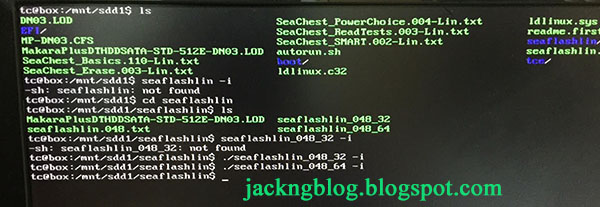
    seaflashlin method does not work

    Previously, I used the "USBbootBuilder-16_Kernel4.3.0-SeaFlashLin-046.USBsetup.exe" to create a TinyCore Linux USB bootable flash drive. Using UEFI boot option, the USB flash drive boots to a /home/tc directory.

    # ls /mnt
    Look for a directory with full write access under /mnt. At my computer, it is sdd1 directory which is the root of the USB flash drive.

    # cd /mnt/sdd1
    This is the TinyCore Linux USB drive files content directory

    Encountered seaflashlin was not found error ?
    Using "./seaflashlin_048_32 -i" or "./seaflashlin_048_64 -i" produce no result ?


    Seagate Barracuda Pro Desktop 3.5 8TB SATA hardisk

    Model Number: ST8000DM005
    Please check your hardisk and write down the model number and serial number as you will need it later.

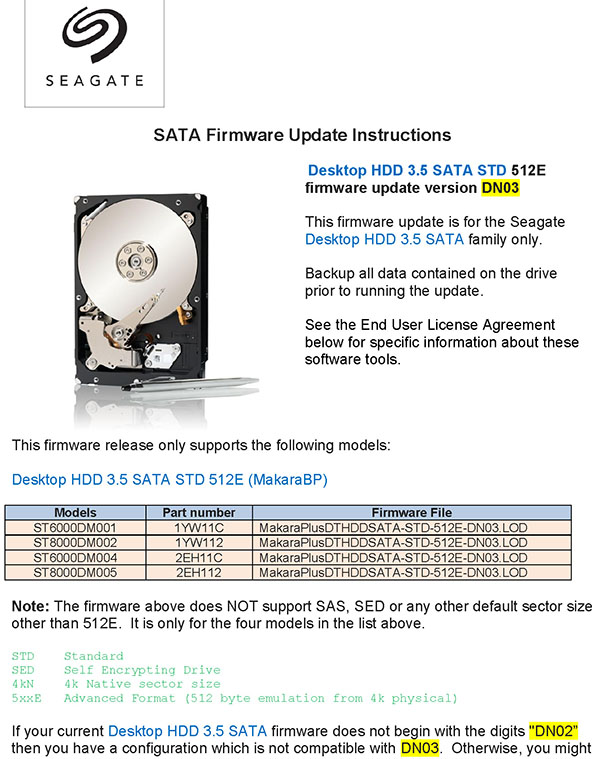
    Using SeaChest method to update the Seagate 8TB hardisk firmware from DN02 to DN03 in order to solve the beeping, buzzing or humming noise during idling.


    Download firmware

    Please click the link below to download the Seagate Desktop 3.5 SATA hardisk firmware:
    https://apps1.seagate.com/downloads/certificate.html?key=1133352274968

    This Seagate hardisk firmware release only supports the following models:

    • ST6000DM001
    • ST8000DM002
    • ST6000DM004
    • ST8000DM005
    If your current Seagate Desktop 3.5 SATA hardisk firmware does not begin with the digits "DN02”, then you have a configuration which is not compatible with DN03. Please contact discsupport@seagate.com for support and do not continue further.


    Warning:
    • Possible loss of data if this firmware is downloaded to unsupported models ! 
    • DO NOT run this firmware update on RAID systems
    • DO NOT turn the power off during the firmware update procedure

    Before you begin:
    • Make sure you have backed up all of your important files and critical data
    • Save any work in progress
    • Close all other open applications
    • Disconnect all external storage devices

    Using SeaChest method to update the hardisk firmware

    1) Please backup your data at the hardrive first before continuing.


    2) In the downloaded firmware package, there is a Firmware folder. The .LOD file is the firmware file. Please copy the MakaraPlusDTHDDSATA-STD-512E-DN03.LOD with a shorter name DN03.LOD.
    # copy MakaraPlusDTHDDSATA-STD-512E-DN03.LOD DN03.LOD


    3) Then, copy the DN03.LOD to the SeaChest command line tools folder
    (\command line tools\SeaChest\).
    The DN03.LOD must be in the same directory as the SeaChest_Firmware_222_11110_32.exe or SeaChest_Firmware_222_11110_64.exe files.


    4) Right-click a command prompt and left-click "Run as administrator".
    If your Windows Operating System (OS) is 32-bit, please use SeaChest_Firmware_222_11110_32.exe.
    If your Windows Operating System (OS) is 64-bit, please use SeaChest_Firmware_222_11110_64.exe.

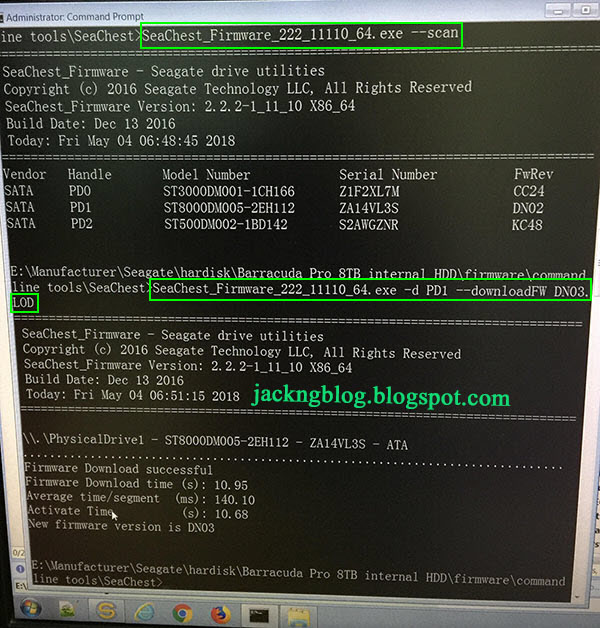
    Assume running Windows 7 x64 OS. In the command prompt, please type SeaChest_Firmware_222_11110_64.exe --scan

    The Seagate 8 TB hardisk that I want to update is ST8000DM005-2EH112 under PD1 Handle. You must select the correct hardisk by checking the Model Number (STxxxx) and Serial Number of your hardisk.


    5) In the command prompt, please type
    SeaChest_Firmware_222_11110_64.exe -d PD1 --downloadFW DN03.LOD

    (The name of my firmware file is DN03.LOD. Please follow this command to change PD1 to the PD location of your hardisk)

    You will see a lot of "points" appear all the time. There can be no power outage at this time. Please do not perform any other operation on the computer and do not interfere with it.

    Finally, "Firmware Download Successful" will appear. The beeping, buzzing or humming noise of the hardisk immediately gone away.

    How to open firewall ports for SolidWorks SolidNetWork License Manager using Microsoft Management Console (MMC) in the Microsoft Server 2016 Standard x64 OS (Rev: 1.0)


    Assume you are using Microsoft Server 2016 Standard x64 Operating System (OS) and already has the SolidWorks 2017 Professional software.

    After running the setup.exe from the SolidWorks 2017 Professional software, if you are installing the SolidWorks Server Products, SolidNetWork License Manager (distributed licensing), you will need to manually open the Microsoft Server 2016 firewall TCP port numbers 25734 and 25735. The SolidNetWork License Manager installation wizard did not automatically open the firewall port numbers 25734 and 25735 despite checking the "A firewall is in use on this server" during the installation process.


    1. Please logon with an Administrator account in the Microsoft Server 2016 Standard x64 OS.

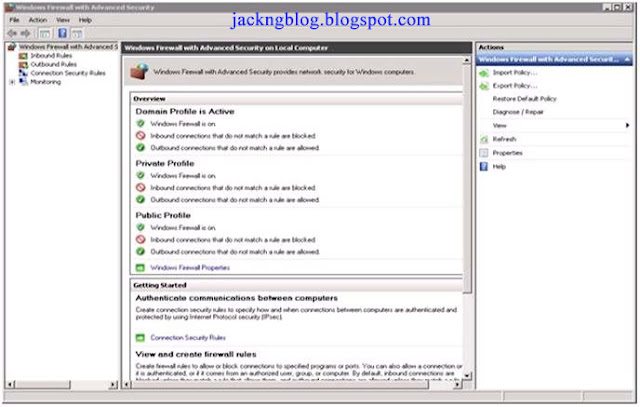
    2. Click the “Search Windows” icon at the taskbar and type “firewall with” in the Search box. Click "Windows Firewall with Advanced Security".


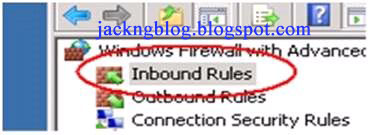
    3. Click the Inbound Rules on the left hand side of the Microsoft Management Console (MMC) to select it.


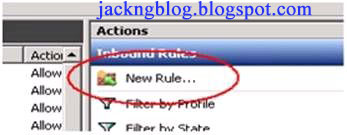
    4. Click New Rule from the right hand side of the MMC.


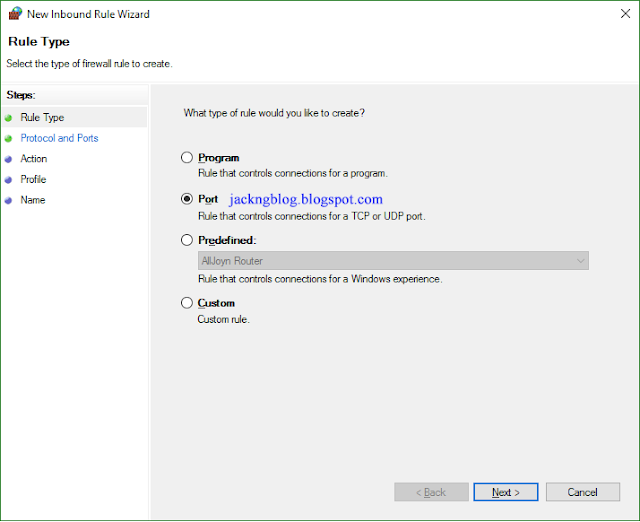
    5. In the Rule Type section, click Port and click Next.


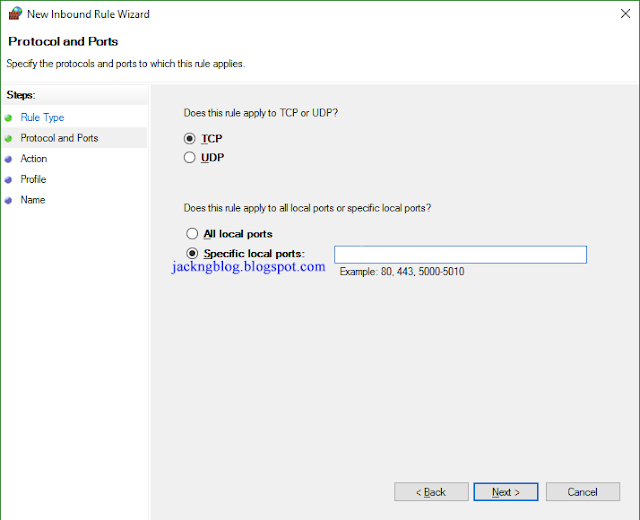
    6. In the Protocol and Ports section, select the type of port (eg: TCP or UDP). I select TCP. Select the Specific local ports and enter the port number that you wish to open (eg: port 25734). Click Next.


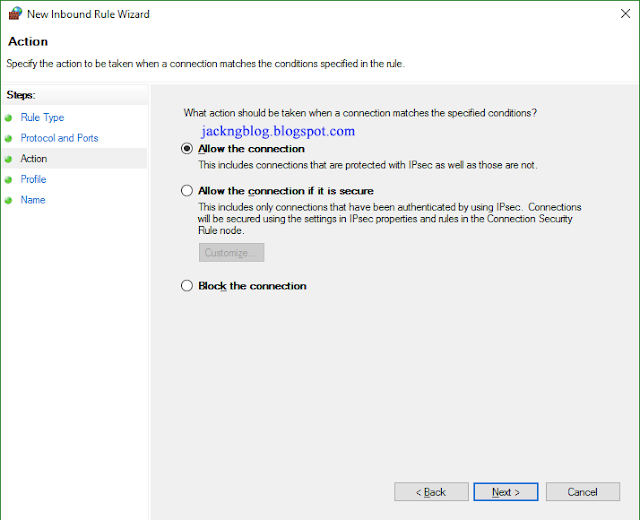
    7. In the Action section, select Allow the Connection and click Next.


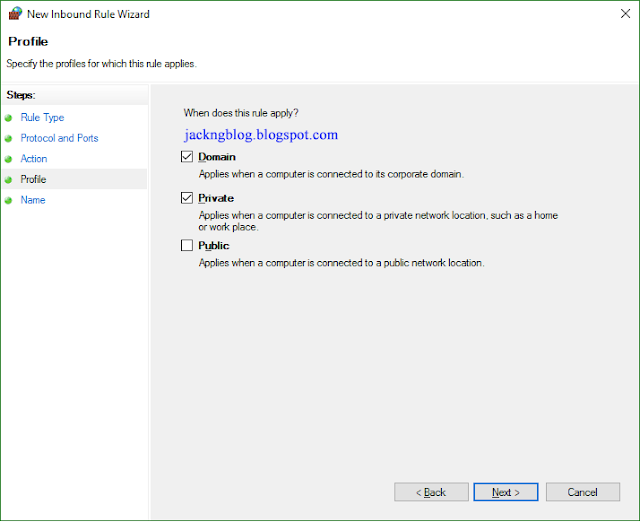
    8. In the Profile section, I check the Domain & Private selections and click Next.


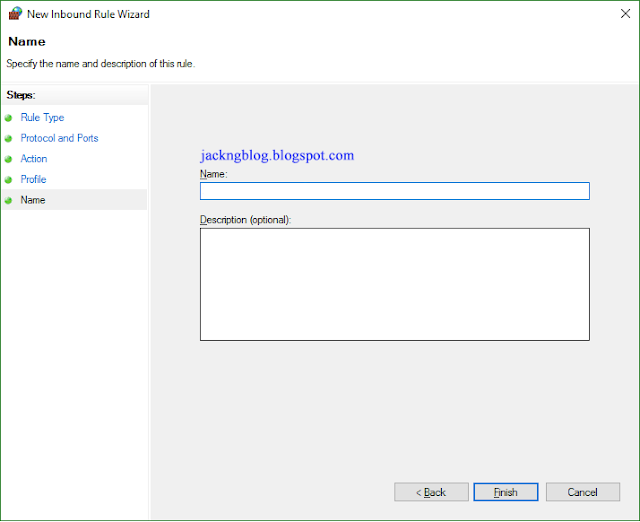
    9. In the Name section, I choose to enter "SolidWorks_TCP_25734" so that I know this open TCP port number is for SolidWorks software. Click Finish.


    10. Please repeat step 4 to 9 for another TCP port number 25735.

    Solved can't read file header, unknown file format or file not found errors in irfanView (Rev: 1.1)


    When opening Chinese comics .jpg files using IrfanView v4.42 64 bit in Windows 10 Enterprise x64 Operating System (OS), the below error appeared:

    Can't read file header ! 
    Unknown file format or file not found.

    However, those Chinese comics .jpg files open without any error in the Microsoft Photos App.


    Solution:

    1. In Win10 OS, click the "Search Windows" icon and search for "language".

    2. Click the "Language Control Panel" (or Control Panel\All Control Panel Items\Language).

    3. Click the "Change date, time, or number formats" > Administrative > "Language for non-Unicode programs".

    4. Click the "Change system locale..." button and select "Chinese (Simplified, China)". This will change the "Current language for non-Unicode programs:" to "Chinese (Simplified, China)". Restart the pc for the change to take effect.


    Solved copype.cmd WinPE processor architecture, firmware files was not found errors, and MakeWinPEMedia.cmd failed to set the boot code error when using Windows 10 ADK (v1.1)


    Assume running Windows 7 Enterprise x86 Operating System (OS) and had already installed the original RTM version (10.0.26624.0) of Windows 10 Microsoft Assessment and Deployment Kit (ADK).  
    [Download link for Windows ADK for Windows 10]

    To solve the below WinPE errors when running copype.cmd:

    copype x86 e:\winpe10_x86


    ERROR: The following processor architecture was not found: x86.
    Failed!


    ERROR: The following path for firmware files was not found: "\..\..\x86\Oscdimg".
    Failed!


    Solutions

    Modified the copype.cmd, "set SOURCE" and "set FWFILESROOT" as shown below (accordingly to your Windows OS type) :

    Win7 Enterprise x86 OS

    "C:\Program Files\Windows Kits\10\Assessment and Deployment Kit\Windows Preinstallation Environment directory\copype.cmd":


    rem copype.cmd, line 20
    rem set SOURCE=%WinPERoot%\%WINPE_ARCH%
    set SOURCE=C:\Program Files\Windows Kits\10\Assessment and Deployment Kit\Windows Preinstallation Environment\%WINPE_ARCH%

    rem copype.cmd, line 21
    rem set FWFILESROOT=%OSCDImgRoot%\..\..\%WINPE_ARCH%\Oscdimg
    set FWFILESROOT=C:\Program Files\Windows Kits\10\Assessment and Deployment Kit\Deployment Tools\%WINPE_ARCH%\Oscdimg


    Win7 Enterprise x64 OS

    "C:\Program Files (x86)\Windows Kits\10\Assessment and Deployment Kit\Windows Preinstallation Environment directory\copype.cmd":


    rem copype.cmd, line 20
    rem set SOURCE=%WinPERoot%\%WINPE_ARCH%
    set SOURCE=C:\Program Files (x86)\Windows Kits\10\Assessment and Deployment Kit\Windows Preinstallation Environment\%WINPE_ARCH%

    rem copype.cmd, line 21
    rem set FWFILESROOT=%OSCDImgRoot%\..\..\%WINPE_ARCH%\Oscdimg
    set FWFILESROOT=C:\Program Files (x86)\Windows Kits\10\Assessment and Deployment Kit\Deployment Tools\%WINPE_ARCH%\Oscdimg


    Install Windows PE to the USB thumbdrive

    Plug in your USB thumbdrive. Right-click the (Start > All Programs > Accessories) "Command Prompt" shortcut and left click "Run as administrator".

    Enter the below diskpart commands (optional) to prepare the thumbdrive that will erase all data and format the thumbdrive as FAT32 file system with the below assumptions:
    • USB thumbdrive is located at disk number 3
      (Important: change according to your USB thumbdrive disk number by checking the disk size)

    • Primary partition created is at partition number 1.
      If you created more than 1 partition in your USB thumbdrive, you can use the below diskpart commands:

      list partition
      select partition 1

    • USB thumbdrive is assigned to t: drive

    diskpart
     list disk
     select disk 3
     clean

    (Warning: Diskpart Clean command will erase all data on the selected disk. Please ensure that you have select the correct disk number)
      create partition primary
     format quick fs=fat32 label="WinPE10"

    (Warning: Diskpart Format command will wipe the selected disk)
     
     
    assign letter="t
     active
     exit


    Encountered the below WinPE errors when running MakeWinPEMedia.cmd:

    MakeWinPEMedia /UFD e:\winpe10_x86 t:

    WARNING, ALL DATA ON DISK DRIVE t: WILL BE LOST!
    Proceed with Format [Y,N]?N

    Setting the boot code on t:...
    'bootsect.exe' is not recognized as an internal or external command, operable program or batch file.
    ERROR: Failed to set the boot code on t:.


    Solution

    To solve the "
    bootsect.exe' is not recognized as an internal or external command, operable program or batch file" error:

    WinPE x86

    Copy
    C:\Program Files\Windows Kits\10\Assessment and Deployment Kit\Deployment Tools\
    x86\BCDBoot\bootsect.exe
    to
    C:\Program Files\Windows Kits\10\Assessment and Deployment Kit\Windows Preinstallation Environment\


    WinPE amd64

    Copy
    C:\Program Files (x86)\Windows Kits\10\Assessment and Deployment Kit\Deployment Tools\
    amd64\BCDBoot\bootsect.exe
    to
    C:\Program Files (x86)\Windows Kits\10\Assessment and Deployment Kit\Windows Preinstallation Environment\

    be2.sg match making service scam (rev: 1.0)


    www.be2.sg website is suspected to be a cyber fraud (欺诈)  match making website, with the below international websites as shown below:
    • Encontrar pareja be2 (www.be2.es/)
    • Rencontre be2 (www.be2.fr/)
    • Incontri single be2 (www.be2.it/)
    • Site de relacionamento be2 (www.be2.com.br/)
    • Randki be2 (www.be2.pl/)
    • Dating UK be2 (www.be2.co.uk/)

    After completing the imposed "scientific" personality test to extract information about you, you will see blur lady images, receiving "many of those system auto-generated messages" who had quickly expressed their "interested" on you within a day, get constant auto "log out" and frequent "Subscribe to Premium Membership to read your messages" pop-up under the complimentary free membership.

    People who had subscribed to the trial short-term premium membership by paying a little amount (promotion or festival offer) often end up being deducted full annual premium membership amount because they did not cancel the trial short-term premium membership offer as stated in the be2.sg Terms and Conditions. Cancelling the trial short-term premium membership through be2.sg website was not enough because you also have to send a fax to be2.sg, a week before the trial premium membership was due.

    People who had subscribed to the premium membership by providing their credit card details to pay for their annual membership will not be informed about the deduction or receiving any invoice. If the automatic renewal of your premium membership deduction failed, you will face the legal action because of the valid contract between you and be2.sg. However, we have never hear any court case between consumer and be2.sg in Singapore before.

    As be2.sg is not a local entity company in Singapore, Consumers Association of Singapore (CASE) will not be able to help you. The advise is to cancel your credit card, get your respective bank to blacklist be2.sg, and get a replacement credit card in order to prevent unauthorized online transaction in future.


    References

    1. Be2 Singapore

    2. BE2 scam. received an email from a solicitor representing b2

    3. Consumer complaints and reviews about be2

    Catfishing and reverse image search tools (Rev: 1.1)


    Catfishing is an online activity involving a person using someone else photos to create a digital identity and post fake online information to produce a convincing social circle for various reasons (con money from people, seeking revenge on someone, etc).

    You can find out where else an image appears online by using the Reverse Image Search Tools:
    More Reverse Image Search Tools are at "Reverse Image Search Engines, Apps And Its Uses".


    Some signs that you might be getting catfished online:
    1. If they seem too good to be true or they look like a model, movie stars or other famous people
    2. If you meet someone online and they have broad interests that could relate to just about anyone
    3. If they say that they care about you and they act like things are getting serious after only a short amount of time
    4. If they don't know what Skype is or have problems using it or downloading it and you can only chat online
    5. If they contact you out of nowhere and you do not know them, and they try to romance you over chat and email
    6. If they have far-fetched stories that make you feel sorry for them and ask you for money to help them
    More information on "12 signs that you might be getting catfished online".


    To prevent catfishes or Internet scammers from stealing your details,
    • You can set your privacy settings to the highest security level on social media so that only friends can access your photos.
    • Avoid posting too much personal information on the social media or public.


    Always exercise caution when dealing with unknown persons “befriended” through the Internet:
    • Avoid going overseas alone with persons whom you know through the Internet.
    • Report to the administrators of the dating site or social network if you suspect that you are targeted.
    • If you are a Singaporean, inform the Singapore Police Force (SPF) immediately if anyone attempts to extort money from you.


    References

    1. WebUser issue 368 (April 2015), page 36, Our guide to Catfishing

    2. Reverse Image Search Engines, Apps And Its Uses

    3. 12 signs that you might be getting catfished online

    4. Singapore Police Force (SPF) 

    Websites that offers programs with bundled crapware or PUP (Rev: 1.1)


    To cover their operating costs where advertising may not generate enough revenue, majority of websites have offer software programs with bundled crapware, or Potentially Unwanted Programs (PUP). Below are those websites that offers programs with bundled crapware or PUP:
    • download.com or download.cnet.com
    • FileHippo.com
    • FreewareFiles.com
    • MajorGeeks.com
    • NoNags.com
    • Softpedia.com
    • SnapFiles.com
    • SourceForge.net
      (FileZilla software had opt in to the crapware ads. More info at "Warning: Don’t Download Software From SourceForge If You Can Help It")
    • tucows.com
      (Almost everything in their top downloads list is a scammy fake scareware applications)

    How to avoid unwanted crapware or PUP

    1. Download the software from the original author's website because it minimize additional installer that serve unwanted crapware or PUP. However, there is no guarantee that they are free from unwanted crapware or PUP.

    2. If the programs have both the installer and portable versions, download the portable option to prevent unwanted bundle programs to be installed. For example,
    3. If you cannot find the portable version at the author's website, please try
    4. Before starting to install the programs on your physical computer Operating System, please test running the download programs in an isolated virtual environment such as
      • VirtualBox (Runs on Windows, MAC and Linux. Support snapshots. Free)
      • VMware Player (Runs on Windows and Linux. Does not support snapshots. Free for personal use only)


    References:

    1. Yes, Every Freeware Download Site is Serving Crapware (Here’s the Proof)

    2. WebUser issue 369 (April 2015), page 37, Why you can't trust download sites  

    3. "Warning: Don’t Download Software From SourceForge If You Can Help It".

    Rombertik malware. Software to backup MBR and computer (v1.1)


    According to the Talos security labs team at Cisco (Threat Spotlight: Rombertik – Gazing Past the Smoke, Mirrors, and Trapdoors), a new malware threat called Rombertik is spreading via spam and phishing emails, and installs itself in your browser to steal your banking logins and other sensitive data.

    Upon execution, Rombertik will stall and run through a first set of anti-analysis checks to see if it is running within a sandbox.  Once these checks are completed, Rombertik will proceed to decrypt and install itself on the victims computer to maintain persistence. Then, the malware checks to see if its code has been analyzed in memory. If it has, it destroys the Master Boot Record (MBR) of your computer and reboot your computer. The reboot process will get stuck at a screen reading "Carbon crack attempt, failed". You will need to reinstall your Operating System (OS) in order to get your PC to work again.

    If Rombertik cannot wipe your computer MBR, it will destroy all files in the user's home folder (eg: C:\Documents and Settings\Administrator\) by encrypting all the files in it.

    The advice to avoid such attacks is not to open attachments or links in unexpected or dodgy (狡猾的; 危险的) emails, and keep your OS and anti-virus software up to date. You should constantly back up your files so that you have a backup copy to prevent disaster cases like Rombertik encrypting your files.


    Backup computer Master Boot Record (MBR)


    To backup your computer MBR, please refer to "Fixmbr, Backup your MBR using MBRwizard or MBRFix".


    Software to backup your computer


    1) AOMEI Backupper Standard v2.8 or higher version (Free)
    • Backup system and create a system image to keep Windows and applications safe.
    • Back up entire hard disk or specified partitions, or just cloning them.
    • Save time and effort with automatic backup and incremental backup only for modified or added files.
    • Back up your most important files and folders on a regular basis.


    2) EaseUS Todo Backup Free v8.3 or higher version
    • Full/Incremental/Differential/Schedule backup
    • System/Partition/File backup and recovery
    • Disk clone, migrate OS to SSD/HDD
    • Support MBR & GPT disk, hardware RAID, UEFI boot, WinPE bootable disk
    • Windows 10 ready


    3) Acronis True Image (ATI) 2015 for pc (Not free. $69.99 for 1 computer license)

    Acronis True Image for pc software is one of the best backup & recovery software. However, there are a few negative comments on the latest version of ATI 2015. It did not recognize those ATI 2014 or below version backups. ATI 2014 or below version cannot restore an ATI 2015 backup. Only ATI 2015 can restore an ATI 2015 backup.

    Only chat support is provided. No phone or email contact is provided.  User that had used chat support before feedback that it was like someone reading from a script who is not knowledgeable about computers or their own Acronis products.

    The below features are discontinued in ATI 2015:
    • E-Mail backup
    • Acronis Extended Capacity Manager (Allows Windows XP users to work with disks of over 3TB in size)
    • Boot-sequence manager (Allows to boot your system from bootable backup)
    • "Try & Decide" (Allows to temporarily change your system)
    • Local and mixed synchronization (Allows to sync 2 folders on local drives)

    Users comments on ATI 2015 are available at Acronis forum: "65498: Summary of Features Removed in ATI2015".


    References

    [1] Threat Spotlight: Rombertik – Gazing Past the Smoke, Mirrors, and Trapdoors

    [2] AOMEI Backupper Standard v2.8 or higher version (Free)

    [3] EaseUS Todo Backup Free v8.3 or higher version

    [4] Acronis True Image (ATI) 2015 for pc

    [5] Features that are discontinued in ATI 2015 

    [6] Acronis forum: 65498: Summary of Features Removed in ATI2015

    [7] WebUser issue 371 (May 2015), page 9, New PC malware destroys your data

    DriverPacks for Windows Vista/7 (x86) [Rev: 1.0]


    Each DriverPack is a package of drivers for a particular category of hardware. More info from http://driverpacks.net/ (Win7 x86 drivers). Please surf http://md5deep.sourceforge.net/ to download "md5deep and hashdeep" (for Windows OS) software to check the MD5 checksum.

    Below are the DriverPacks for Windows Vista/7 (x86) only:

    DriverPack Mass Storage v12.12.1 for Windows Vista/7 (x86)
    DP_MassStorage_wnt6-x86_12121.7z (3,539,958 bytes)
    .7z MD5 checksum: a69f69b8dbc4519f5cb49f841cd15e37


    DriverPack Chipset v12.12 for Windows Vista/7 (x86)
    DP_Chipset_wnt6-x86_1212.7z (5,350,217 bytes)
    .7z MD5 checksum: c7688cba83ff4bbb13be70bfd504f3be


    DriverPack LAN v12.08 for Windows Vista/7 (x86)
    DP_LAN_wnt6-x86_1208.7z (10,062,195 bytes)
    .7z MD5 checksum: dcebfb99ee92e73bd302205fbc8c0232


    DriverPack WLAN v12.03 for Windows Vista/7 (x86)
    DP_WLAN_wnt6-x86_1203.7z (16,064,224 bytes)
    .7z MD5 checksum: 151cc74ff5e14e69a547fd4064d18bae

    DriverPacks for Windows Vista/7 (x64) [Rev: 1.0]


    Each DriverPack is a package of drivers for a particular category of hardware. More info from http://driverpacks.net/ (Win7 x64 drivers). Please surf http://md5deep.sourceforge.net/ to download "md5deep and hashdeep" (for Windows OS) software to check the MD5 checksum.

    Below are the DriverPacks for Windows Vista/7 (x64) only:

    DriverPack Mass Storage v12.12.1 for Windows Vista/7 (x64)
    DP_MassStorage_wnt6-x64_12121.7z (4,034,194 bytes)
    .7z MD5 checksum: 99095e8f9e8b775f6e07e5723907df0a


    DriverPack Chipset v12.12 for Windows Vista/7 (x64)
    DP_Chipset_wnt6-x64_1212.7z (6,505,668 bytes)
    .7z MD5 checksum: abc8a0696eee5e44c85ef44e23b36908


    DriverPack LAN v12.08 for Windows Vista/7 (x64)
    DP_LAN_wnt6-x64_1208.7z (13,697,053 bytes)
    .7z MD5 checksum: 4cb48a242081ea4062547163f8791d2b


    DriverPack WLAN 12.03 for Windows Vista/7 (x64)
    DP_WLAN_wnt6-x64_1203.7z (15,475,889 bytes)
    .7z MD5 checksum: 59a2552d44c158b64bbf810a2e324fe2 


    DriverPack Graphics A 12.03 for Windows Vista/7 (x64)
    DP_Graphics_A_wnt6-x64_1203.7z (219,623,625 bytes)
    .7z MD5 checksum: 2eb8f26ffb049eda8f2fb73df23181f3


    DriverPack Graphics B 12.03 for Windows Vista/7 (x64)
    DP_Graphics_B_wnt6-x64_1203.7z (308,361,426 bytes)
    .7z MD5 checksum: 3adb2a3296c0d20de37ffd1edc4a4065

    Solved Ubuntu Desktop v14.04 boot menu failed to appear error after installation in the Dell Optiplex 9020 pc (Rev: 1.0)


    Situation


    The Dell Optiplex 9020 pc comes with 2 pieces of Seagate Barracuda 1 TB SATA 6.0 Gb/s hardisk installed:
    • hardisk 0 (ST1000DM003-1CH162 that is the second boot in the BIOS boot sequence) will be installed with Ubuntu Desktop v14.04 Operating System (OS).

    • hardisk 1 (ST1000DM003-1CH162 that is the first boot in the BIOS boot sequence) was already installed with Windows 7 Enterprise x64 SP1 OS.

    I installed Ubuntu Desktop v14.04 at hardisk 0 and have restarted the Dell Optiplex 9020 pc after the end of the Ubuntu Desktop v14.04 installation. The Ubuntu boot up menu did not appear during boot up and the pc boot directly into Windows 7 OS. This is because the Dell Optiplex 9020 pc BIOS default boot sequence is still set to boot from hardisk 1 (where Windows 7 Enterprise x64 SP1 OS is installed) first.

    Solution


    After changing the Dell Optiplex 9020 pc BIOS boot sequence (press [F2] to boot into BIOS > General > Boot Sequence) to boot from hardisk 0 (where Ubuntu Desktop v14.04 OS is installed) first, the Ubuntu boot up menu appear during boot up.


    Ubuntu Boot Repair Tool


    You can try the Ubuntu Boot Repair Tool from an Ubuntu LiveCD or LiveUSB thumbdrive to fix the Ubuntu bootloader (GRUB) problem:

    1) Please boot from Ubuntu LiveCD or LiveUSB thumbdrive > click "Try Ubuntu".

    2) In Ubuntu Live, make sure you have internet connection because we need to install the Ubuntu Boot Repair Tool. Kindly open a terminal (term) and type the below commands to install the Ubuntu Boot Repair Tool:

    sudo add-apt-repository -y ppa:yannubuntu/boot-repair

    sudo sed 's/trusty/saucy/g' -i /etc/apt/sources.list.d/yannubuntu-boot-repair-trusty.list

    sudo apt-get update

    sudo apt-get install -y boot-repair && boot-repair


    3) In the pop up "Boot Repair" > click "Recommended repair (repairs most frequent problems)"

    4) After the recommended boot repair is completed, please restart your pc.

    5) For Dell Optiplex 9020 pc, press [F2] to boot into BIOS. Please change the BIOS boot sequence to boot from that hardisk where Ubuntu Desktop v14.04 OS is installed.

    Reference:


    1. How to install the Boot-Repair tool in an Ubuntu live disc ?

    ActiveSG $100 for Singaporeans and Singapore Permanent Residents (PR) to play sport (Rev: 1.0)


    The Singapore government had announced on 26 April 2014 a S$100 payout for all Singaporeans and Singapore PR to encourage sports. If you are above 16 years old, you can register for a free lifetime ActiveSG membership to receive your ActiveSG $100 payout via the following channels:
    1. Downloading the "ActiveSG" (iTunes App Store for Apple iPhone, iPad and iPod touch, Google Play for Andr​​oid) mobile app on your smart phone or
    2. https://members.myactivesg.com or
    3. Register at any Guest Services Office at all ActiveSG Sports Centres and swimming complexes.

    After registration, you will need to verify your ActiveSG membership accounts by logging in to SingPass via https://members.myactivesg.com and set a 6-digits PIN for your eWallet.

    Alternatively, you can visit any of the Sports Centres and produce your NRIC/Birth Certificate at the Guest Services Office. Upon verification, please set your 6 digits eWallet PIN and you will be able to view the complimentary ActiveSG $100 credited into your account.

    For enquiry on ActiveSG, please call 1800 344 1177 (Monday to Friday, 9am to 6pm).


    ActiveSG $100 expire date

    The complimentary ActiveSG $100 will expire on 31 December of the following year upon verification of the ActiveSG accounts. For example, ActiveSG dollars issued on 11 July 2014 (or any other day in the same year) will expire on 31 December 2015 (the following year).

    Singaporeans and Singapore PRs can sign up for their complimentary ActiveSG membership anytime. While the membership has no expiry date, it is vital to include an expiry date for the utilisation of the ActiveSG $100 so as to encourage members to begin or step up on their sporting pursuits sooner rather than later.


    ActiveSG $100 usages
     

    The ActiveSG $100 can be used for:
    • Pool and gym admission
    • ActiveSG programmes and activities (capped at 30% of the cost for each programme or activity, with no limit on number of programme or activity sign-ups)
    • ActiveSG facilities booking (excluding Dual-Use-Scheme facilities)
    • Purchase of MyActiveGYM and MyActiveSWIM schemes


    Utilize your benefits


    No membership card is issued for the lifetime ActiveSG membership. ActiveSG members can enjoy a convenient cardless experience whereby they can utilize their benefits using the downloaded "ActiveSG" app on their smart phones.

    If you do not own a smart phone, you may use the following cards to utilize your benefits:
    - NRIC
    - Singapore driving license
    - School SMART card
    - Senior Citizens concession card
    - PAssion card


    References

    1. ActiveSG

    2. ActiveSG$100 for Singaporeans to play sport

    Roman Duo DeliCooker HL-400 (Rev: 2023-04-24)


    I had bought the Roman Duo DeliCooker HL-400 (S$1288.00 including 7% GST & delivery) on March 2014.

    I had found a Vees Electric Hob HL-400NEG from Malaysia that had exactly the same design, outlook & specifications. The only different is the name: Roman (selling DeliCooker in Singapore) vs Veees (selling DeliCooker in Malaysia).


    [JackNg, update on 2023-04-24]

    Roman Duo DeliCooker HL-400 is S$1588.00 (including 8% GST & free delivery) since 1 Feb 2023.
    • Replacement of Left-Hand-Side (LHS) burner is S$120.00 (update on 2023-02-08).

      On 2023-02-08, the LHS burner was not hot and was replaced at S$120.00 by Kuan Fat Trading Pte Ltd.

      On 2023-04-24, the LHS burner became not hot again despite that we seldom cook on weekdays and only cook during weekend. Upon checking by Kuan Fat Trading technician, I was told that the top control board + below PCB need to be replaced at S$350.00 (has 6 months warranty), a sharp increase of S$70 from S$280.00 (2023-02-08) because they review the parts price every 3 months and the PCBs parts were delivered via flight.

    • Replacement of Right-Hand-Side burner is S$180.00 (update on 2023-02-08).

    • Replacement of top control board + below PCB are S$280.00 on 2023-02-08 (has 6 months warranty). On 2023-04-24, the price had increased to S$350.00.

    • Free collection of faulty Roman Duo DeliCooker HL-400 from your home to Kuan Fat Trading Pte Ltd for checking. However, if you do not accept the service charge later, the transportation charge will cost S$40.00 (collect and return back your faulty Roman Duo DeliCooker HL-400).


    The Roman Duo DeliCooker HL-400 requires a 18 Ampere (A) socket. According to the vendor, you will need to install a 15A wall socket that is connected with a power socket of round-pin type (but has no fuse inside the power socket) that is normally use in the air-con:


    Picture 1: 15 Ampere (A) wall socket (round pin type)


    It is not recommended to use the normal 13A power socket that is used in Singapore because the high 18A current consumption might blow the 13A fuse and cut off the power supply. Hence, you might want to consider laying a new electrical wiring to connect the Roman Duo DeliCooker HL-400 to your home circuit breaker (advisable to use a spare 20A circuit breaker only for the Roman Duo DeliCooker HL-400) at a cost of around S$80 (no drilling) to S$120 (with drilling).


    [JackNg updated] After studying my home electrical connection diagram, there are 8 unit of 13A wall sockets (P18 to P25) connecting to a 32A (B32) Miniature Circuit Breaker (MCB, P3):
    • Living room 13A wall socket is P18.
    • Kitchen 13A wall sockets are from P19 to P22, P24 to P25.
    • Service yard 13A wall socket is P23.
    As the P22 13A wall socket in the kitchen is the nearest to the Roman Duo DeliCooker HL-400, I change the P22 13A wall socket to a 15A wall socket with round-pin type (Picture 1). This eliminate the need to lay a new wiring from my home circuit breaker to the kitchen.


    The Roman Duo DeliCooker HL-400 wire (slightly thicker than normal 13A cable) length is around 1.8 meter (excluding the plug) and is not-detachable type. The wire is locates underneath the DeliCooker at around the lower Left Hand Side (LHS).

    After deducting about 40 cm (0.4 meter) width of the DeliCooker, the wire length has left around (1.8 m - 0.4 meter) 1.4 meter to connect to the wall socket. You might want to consider the wire length if you want to install the Roman Duo DeliCooker HL-400 as built-in type where the vendor recommend cutting dimension is 67 cm (Length) x 40 cm (Width).

    Picture 2: To install the Roman Duo DeliCooker HL-400 as built-in type, recommend cutting dimension is 67 cm (Length) x 40 cm (Width)


    Please donate. Thanks.


    paypal.me/jackngch
    (PayPal-to-Paypal account only)

    Popular Posts